Context: where enterprise HubSpot programmes lose velocity
HubSpot's public-facing positioning ("all-in-one CRM platform") under-sells the platform for enterprise readers. The truth is that HubSpot at the Professional and Enterprise tiers is a genuine alternative to Salesforce + Marketo for B2B and SaaS companies up to roughly Rs 500 crore ARR. Above that, Salesforce's ceiling is higher; below that, HubSpot's per-seat economics and integration simplicity usually win.
The failure pattern we see on enterprise HubSpot programmes is data-architecture drift. The implementation starts clean: Lifecycle Stages defined, custom properties named per convention, workflows composable. Year 2 the team has 280 custom contact properties, 14 of them duplicates, 9 of them deprecated but still referenced by old workflows, and the marketing-ops team spends 30 percent of its time disambiguating "which property do I actually use." The platform did not cause this; absent governance, the platform allowed it to happen.
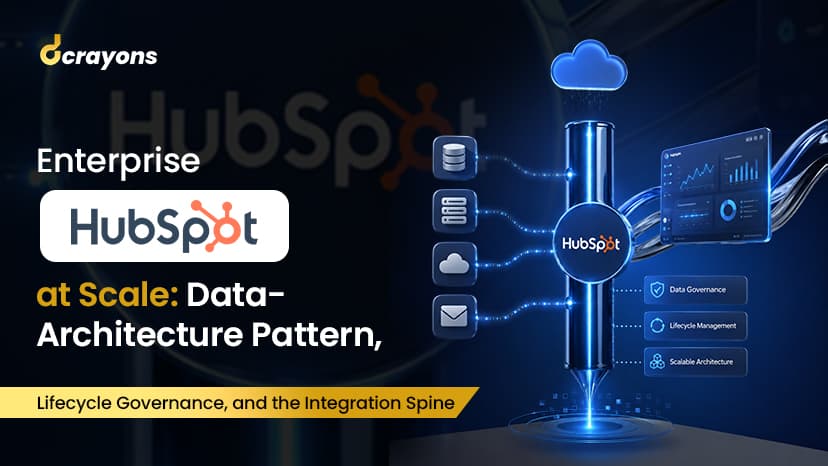
This piece is the reference architecture Dcrayons deploys for enterprise HubSpot customers. It covers four areas the public documentation under-foregrounds: the multi-hub data-architecture pattern, lifecycle governance + custom-objects discipline, the integration spine that connects HubSpot to the rest of the customer's stack, and the audit posture for GDPR + DPDP + SOC 2 compliance.
Architecture: multi-hub data architecture
HubSpot's data model is unified across Marketing Hub, Sales Hub, Service Hub, Operations Hub, CMS Hub, and the recently-added Commerce Hub. One Contact object; many integrations to it. This is the platform's biggest advantage over fragmented marketing + CRM stacks. and the biggest discipline test.
The Dcrayons enterprise data-architecture pattern:
Contact = a person. One contact per email address; never duplicate. A contact can hold marketing-lifecycle properties (Lifecycle Stage, Lead Source, MQL Date), sales properties (Owner, BANT score, Last Sales Activity), service properties (Last Ticket Date, NPS Score), and product-usage properties (Login Frequency, Plan Tier, Feature Adoption flags). All on one object.
Company = the business entity. One company per domain; companies have many contacts. Company-level properties hold firmographic data (industry, revenue, employee count, region), account-level metrics (total ARR, churn risk score, account health), and sales-account routing (Account Owner, Account Tier).
Deal = a sales opportunity. One deal per discrete revenue event. Deals associate to one company and many contacts. Deal-level properties hold pipeline data (Stage, Amount, Close Date, Probability) and customer-success-relevant context (Onboarding Owner, Implementation Status).
Ticket = a support or success interaction. Tickets associate to contacts + companies + (optionally) deals. Service Hub centralises these.
Custom Objects (Enterprise tier only) = entities that do not fit Contact / Company / Deal / Ticket. For an Indian SaaS customer this is typically Subscription (recurring revenue contracts), Product Instance (deployed software install), or Integration Account (third-party connector data). Custom Objects associate to standard objects; reports and workflows can reference them.
The architecture rule we enforce: every property has a documented purpose, owner, and lifecycle. Properties without a purpose get retired quarterly. Properties without an owner get reassigned or retired. The Dcrayons property-naming convention prefixes the purpose (mkt_, sales_, service_, product_, custom_) so a custom property's audience is visible at a glance.
Lifecycle governance: stages, definitions, transitions
The single most important governance decision on enterprise HubSpot is the Lifecycle Stage definition lock. Lifecycle Stage is the field both marketing and sales report against; if its definition drifts every quarter, comparison loses meaning.
The Dcrayons lifecycle governance:
Stages locked at implementation. Standard Lifecycle Stages: Subscriber, Lead, Marketing Qualified Lead (MQL), Sales Qualified Lead (SQL), Opportunity, Customer, Evangelist. Optional additions: Other (for misc), Disqualified (with reason). The standard set covers 90 percent of enterprise B2B funnels.
Definitions written down. Each stage has a 1-paragraph definition agreed by marketing leadership + sales leadership + (for compliance) legal. The definition lives in docs/hubspot-lifecycle-definitions.md in the customer's repo, treated as a versioned artifact.
Transitions automated, not manual. A Lead becomes an MQL when the lead score crosses the agreed threshold. The transition fires from a workflow; sales does not manually change stage. The score model is documented and tunable; manual overrides are logged.
Stage age tracked. Time-in-stage is a tracked metric. A contact stuck at MQL for 30+ days triggers a re-engagement workflow; a deal stuck at Opportunity for 45+ days triggers a sales-coaching alert. Aged inventory in the funnel is the slow-killer for enterprise B2B revenue.
Disqualification is a stage, not a deletion. Disqualified contacts move to the Disqualified stage with a reason code (Wrong fit, Bad timing, No budget, Competitor). The contact is not deleted; the lead-source attribution + future re-qualification potential are preserved. Reason codes are reportable so marketing learns which sources produce poor-fit leads.
The integration spine: HubSpot connected to the rest of the stack
Enterprise HubSpot rarely runs alone. The Dcrayons integration spine pattern connects HubSpot to the customer's broader stack via Operations Hub + custom code as needed:
Product analytics -> HubSpot. Segment, Mixpanel, Amplitude, or the customer's internal product DB pushes user-behaviour events to HubSpot via Operations Hub data sync (or a custom webhook handler for events HubSpot's native integrations do not cover). The contact record gains product-usage signals: Last Login, Feature Adoption flags, Session Count, Plan Tier.
Accounting + billing -> HubSpot. For SaaS customers using Stripe, Razorpay subscriptions, or Chargebee, the billing system pushes paid-customer events to HubSpot. The Deal record reflects actual MRR / ARR; the Company record gets a derived Account Health Score.
Support tools -> HubSpot. Customers using Zendesk or Intercom alongside HubSpot push ticket-volume and NPS to HubSpot. Service Hub-only customers get this natively.
Marketing channels -> HubSpot. Google Ads, Meta Ads, LinkedIn Ads conversion events push to HubSpot via Operations Hub. The Contact record gains Lead Source attribution at the channel + campaign + ad-set level, supporting multi-touch attribution reporting in Marketing Hub.
Outbound: HubSpot -> downstream. HubSpot pushes contact + company + deal changes to the customer's data warehouse (Snowflake, BigQuery, Redshift) via Operations Hub. The warehouse is the analytics source of truth; HubSpot is the operational source of truth. Both stay in sync.
The pattern is Operations Hub-led where possible, custom webhook-handler where Operations Hub does not have the specific connector. Webhook handlers run on Vercel serverless or AWS Lambda, are signature-validated, and emit structured logs for audit.
Compliance + audit posture: GDPR + DPDP + SOC 2
Enterprise HubSpot customers operate under multiple compliance regimes. The Dcrayons compliance posture:
Consent capture. Every form submission captures explicit, granular consent (Marketing Communications, Sales Outreach, Product Communications) as separate consent objects. Consent withdrawal is a self-serve action via the preference centre or via a workflow triggered by an unsubscribe.
Data subject access requests. GDPR + DPDP rights (Subject Access Request, Right to be Forgotten, Right to Portability) are handled via HubSpot's GDPR tools: contact-level export, contact deletion with audit log, data-portability JSON export. The customer's privacy team has a documented runbook for handling these requests in the contractual 30-day window.
Retention policy. Contacts with no activity in N years (typically 3-7 depending on customer regulatory profile) are auto-deleted via a scheduled workflow. The deletion is logged; the contact's data is removed from HubSpot but the audit log persists for the legal-mandated retention period.
PII handling. Sensitive fields (national ID, bank details, health data) should not enter HubSpot unless the customer's compliance review explicitly approves. If they must, encryption-at-rest + field-level access control + audit logging are configured before the field is created. Most of the time, sensitive PII lives in the product DB and HubSpot holds only an opaque customer ID reference.
Audit log retention. HubSpot Enterprise's audit log retains user actions; for compliance customers we export the audit log monthly to the customer's log store (typically S3 + Object Lock or the customer's SIEM). The exported log supports auditor queries beyond HubSpot's native retention window.
Production checklist: the rollout sequence
For an enterprise HubSpot programme:
- Discovery + data audit: existing CRM data quality, integration inventory, regulatory profile (GDPR / DPDP / SOC 2 / HIPAA)
- Hub selection: Marketing + Sales + Service + Operations + CMS + Commerce, tier per hub (Pro vs Enterprise)
- Data architecture: contact / company / deal / ticket / custom-objects model documented + signed off by marketing + sales + product + finance leadership
- Lifecycle Stage definitions locked, written down, mapped to the customer's revenue motion
- Property naming convention enforced (
mkt_,sales_,service_,product_,custom_prefix), property ownership matrix maintained - Migration plan: existing CRM data cleaned + de-duplicated before import (not after), bad-data quarantined
- Integration spine: Operations Hub-led syncs, custom webhook handlers for the rest, signature validation, structured logging
- Workflow library: composable workflows (10-30 small workflows per hub), naming convention, owner per workflow
- Lead scoring model: 8-12 rules at start (4-6 firmographic + 4-6 behavioural), threshold tuned over first 90 days
- Compliance: consent capture, retention policy, audit log export cadence, SAR / RTBF runbook
- Reporting: dashboards per role (marketing leadership, sales leadership, service ops, exec), Lifecycle Stage volume tracked weekly
- Adoption: rep + marketer training, ongoing usage monitoring (HubSpot adoption analytics), quarterly health check
References + linked context
- HubSpot enterprise documentation: Operations Hub, Custom Objects, Lifecycle Stages, GDPR tools
- Dcrayons glossary: lifecycle-stage, lead-scoring, workflow, smart-content, attribution-report
If your enterprise HubSpot programme has hit data-architecture drift, lifecycle-definition confusion, or integration-spine fragmentation, this is the architecture we deploy. Reach out via the contact form for a 30-minute review.