Short answer: WhatsApp numbers get banned when you broadcast unapproved promotional messages to people who did not opt in, which triggers spam reports and a falling quality rating. To market safely in India, use the official WhatsApp Business API through a verified provider, send pre-approved message templates only to opted-in contacts, and keep your quality rating high by sending content people actually want.
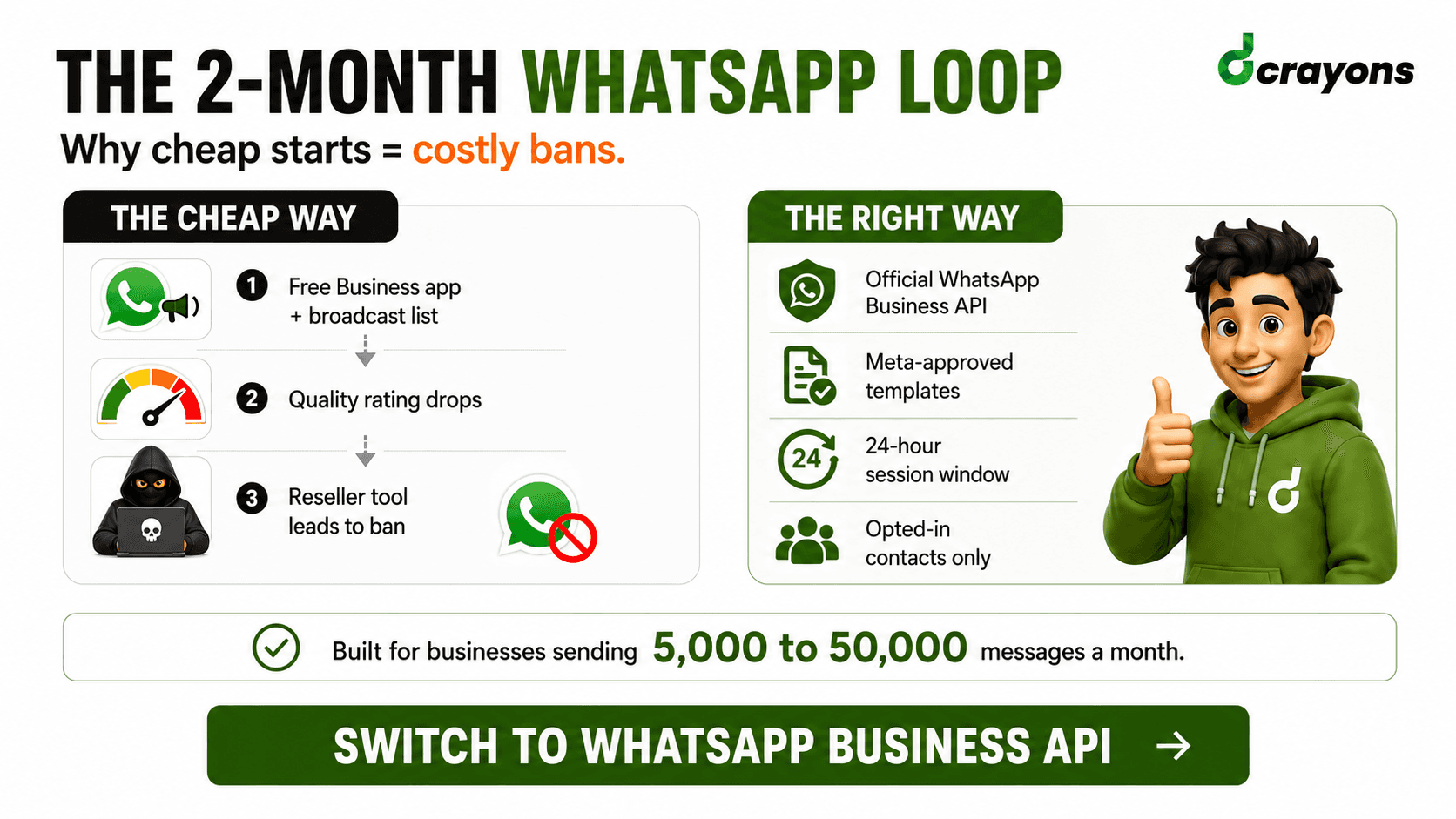
Here is the story almost every small business in India lives through. A shop owner downloads the free WhatsApp Business app, builds a list of customer numbers from invoices and old chats, and starts broadcasting a Diwali offer to a few hundred people from their phone. The first week feels fine. Then the quality rating drops from Green to Yellow. A few more sends and it hits Red. WhatsApp caps how many people the number can message in a day. Within a few weeks, the number is banned.
So the owner buys a "WhatsApp marketing tool" from a reseller that promises unlimited sends and bulk uploads. The new number sends faster, reaches more people, and then gets banned for good, sometimes inside a day. The contacts are gone, the business number is gone, and the customers who actually wanted updates lost a way to hear from the shop.
None of this is bad luck. It is exactly how the platform is designed to behave. Once you understand the mechanics, you can run WhatsApp marketing that does not get banned and that customers do not mute. Here is the full picture.
Why numbers actually get banned: the mechanics
WhatsApp does not ban numbers at random. There are a handful of clear triggers, and almost every ban traces back to one or more of them.
- Spam reports and blocks. When a person taps "Report" or "Block" on your message, that is a direct signal to WhatsApp. A cluster of reports in a short window is the fastest way to a ban. People report messages they did not ask for.
- A falling quality rating. WhatsApp tracks how recipients react to your messages over a rolling window. High reports and blocks push your rating down. A sustained low rating leads to messaging limits and, if it does not recover, a ban.
- Unapproved promotional broadcasts. On the free Business app, you are broadcasting marketing without any template review or consent system. On the API, sending message content that was never approved as a template, or sending the wrong category, breaks the rules.
- Scraped or purchased lists. Uploading numbers you collected without permission, bought from a vendor, or pulled from somewhere is the single most common cause. These people did not agree to hear from you, so they report you.
- Policy breaches. Promoting prohibited goods, sending misleading content, impersonating a brand, or using unofficial bulk-sender tools that violate the Terms of Service all lead to enforcement.
The reseller "tools" deserve a special warning. Many of them automate the consumer app or use unauthorised access methods. They are not the official API. WhatsApp detects the abnormal sending pattern and bans the number. There is no appeal that brings it back.
Free WhatsApp Business app vs the official Business API
These are two different products for two different jobs. Confusing them is where most bans begin.
The free WhatsApp Business app is for a single person running a small shop from a phone. It is great for replying to customers one to one, setting a catalogue, and adding away messages. It is not built for marketing at scale, and broadcasting to a large list from it is what gets numbers flagged.
The WhatsApp Business API (also called the WhatsApp Business Platform) is the official, sanctioned way to send messages at volume. There is no app to install. You connect through a provider, send approved templates, manage consent, and your sending limits grow as you build a track record. This is what real marketing should run on.
| Free Business App | Business API (Platform) | |
|---|---|---|
| Built for | One person, a single phone, small shop | Teams, automation, sending at volume |
| Interface | App on your phone | No app; connects through a provider and your software |
| Marketing broadcasts | Limited and risky; broadcast lists capped, easy to flag | Approved templates to opted-in contacts, sent properly |
| Message approval | None; you send free text | Promotional and notification messages use pre-approved templates |
| Sending limits | Small, fixed, falls fast on poor quality | Tiered; scales up as your quality stays high |
| Consent management | Manual, on you | Built into the workflow; opt-in expected |
| Best for | Solo sellers, very small order volume | Brands doing real marketing and customer notifications |
If you only handle a handful of chats a day, the free app is fine. The moment you want to send order updates or offers to hundreds or thousands of people, you need the API.
What the API setup really involves
You do not get the API directly from a phone. There are three real steps, and skipping any of them stalls everything.
Choose a BSP (Business Solution Provider)
A BSP is an authorised partner that gives you access to the WhatsApp Business Platform plus a dashboard or software connection. The BSP handles the technical link to WhatsApp, your template submissions, and your billing. Picking a reliable BSP matters because they shape how smooth the rest of the process is.
Complete Meta Business verification
Your business needs a verified Meta Business account. This means submitting legal business details and documents so Meta can confirm you are a real, registered company. Verification raises trust and is required to grow your sending limits. In India, having your business registration and supporting documents ready makes this faster.
Register the number and approved display name
You register a phone number to the API. Important: once a number is on the API, you cannot use it in the regular WhatsApp app at the same time. Use a number that is not already tied to a personal account, or be ready to migrate it. You also choose a display name, which Meta reviews. The name has to match your real business and follow the display name rules, or it gets rejected.
Message templates explained
On the API, you cannot just type and blast a promotion. Outbound messages that start a conversation use templates, which are pre-written messages that Meta reviews and approves before you can send them. This is the core mechanism that keeps the platform clean.
The three template categories
Every approved template falls into one of three categories. (Separately, free-form "service" messages, the ones you send to a customer during an open conversation, do not use a template at all; more on that below.)
- Utility. Messages tied to a specific transaction or account: order confirmations, shipping updates, payment receipts, appointment reminders. These follow up on something the customer did.
- Authentication. One-time passwords and login codes. A narrow, specific category for verifying identity.
- Marketing. Offers, product launches, re-engagement, and anything promotional. This is the category with the most scrutiny because it is the one people report when it is unwanted.
Why templates get rejected, and how to avoid it
Templates are rejected for clear, repeatable reasons. Avoid these and most approvals go through:
- Wrong category. Dressing up a marketing message as utility to save on cost is the most common rejection, and it can hurt your account. Categorise honestly.
- Vague or broken variables. Templates use placeholders like a name or an order number. If the example values are missing, mismatched, or the message reads as gibberish without context, it gets rejected.
- Spammy formatting. All caps, excessive symbols, too many emojis, or aggressive sales language.
- Forbidden or sensitive content. Anything that breaks WhatsApp commerce policy, plus misleading or unclear claims.
- Missing context. A message that gives the recipient no clear reason why they are hearing from you.
The approval order that builds trust
Start with utility and authentication templates, which serve people who already interacted with you and which Meta approves more readily. Send those well, keep your quality high, then introduce marketing templates. A new number that opens with heavy promotional broadcasts looks exactly like a spammer. A number that earns trust through useful notifications first has room to add marketing later.
The 24-hour customer service window
This is one of the most useful and least understood parts of the platform. When a customer messages you, a 24-hour customer service window opens. Inside that window, you can reply with free-form messages: plain text, images, whatever the conversation needs, no template required. The window keeps refreshing each time the customer messages again.
Once 24 hours pass with no new message from the customer, the window closes. After that, to start a new conversation you must use an approved template. You cannot send free text to re-open it.
Why this matters: it pushes you toward real conversations and away from cold blasting. It also affects cost and quality. Replying inside the window during an active chat is the natural, low-friction way to serve customers, and customers rarely report a reply to a message they just sent.
How WhatsApp billing works, explained simply
As of 1 July 2025, WhatsApp moved from the older conversation-based model to per-message pricing. You are charged when a template message is delivered, and the rate depends on the template's category (marketing, utility, or authentication) and the recipient's country. The categories are priced differently from one another.
Two things are worth knowing about cost and the 24-hour window. Free-form replies you send inside an open customer service window are not charged, and utility templates delivered inside that window are also not charged. Marketing templates and authentication templates are billed per delivery. So conversations that customers start, and the useful follow-ups inside them, are the cheapest way to use the channel, while business-initiated marketing is the most expensive.
The practical takeaway, without quoting any rate: marketing is the most expensive category, so volume and relevance both matter. Blasting marketing to a cold list is expensive and it wrecks your quality rating at the same time. Sending the right message to people who want it costs less to run and performs better. Exact pricing changes over time and varies by provider, category, and country, so always confirm current rates with your BSP before you plan a budget.
Quality rating and messaging limit tiers
Two systems work together: your quality rating and your messaging limit tier.
Quality rating is shown as a colour for each number:
- Green: high quality, healthy. Customers are engaging, not reporting.
- Yellow: medium quality, a warning. Reports or blocks are rising.
- Red: low quality, danger. If it stays here, you face restrictions and risk a ban.
The messaging limit tier controls how many business-initiated conversations you can start in a rolling 24 hours. New numbers begin at a small tier. As you send to engaged users while keeping quality high, you move up through higher tiers, each allowing more daily conversations. The tiers scale meaningfully, so a number that earns trust over time can eventually message a large audience. A number with poor quality stays stuck or drops.
What drops your rating: high block and report rates, sending to people who did not opt in, irrelevant or too-frequent messages, and content that frustrates recipients. The fix is not a trick. It is sending fewer, more relevant messages to people who want them.
Opt-in done right
Consent is the foundation. Opt-in means the person clearly agreed to receive WhatsApp messages from you. Get this right and most of your other problems disappear, because people who opted in do not report you.
- Be explicit. A checkbox or clear line at the point of capture saying the customer agrees to receive WhatsApp updates from your business. The phone number alone is not consent.
- Capture where intent is high. Checkout, account creation, a "get updates on WhatsApp" button, a click-to-WhatsApp ad, or an in-store sign-up. People who take that action want to hear from you.
- Keep records. Note when and how each contact opted in. This protects you and helps you keep the list clean.
- Practise list hygiene. Remove people who never engage, honour every opt-out immediately, and never re-import a list someone unsubscribed from.
- Segment. Send order updates to recent buyers, offers to people who actually browse a category, reminders to people with items left behind. Relevant segments get engagement; one giant list to everyone gets reports.
Buying a list, scraping numbers, or uploading every contact in your phone is not opt-in. It is the fastest route to a ban.
A real setup checklist
The usual "five steps" are too thin to be useful. Here is what setting up actually looks like.
1. Pick a number and a BSP
- Choose a phone number that is not tied to a personal WhatsApp account.
- Select a Business Solution Provider that fits your volume and gives you a clean dashboard or a connection to your own software.
2. Get verified
- Set up your Meta Business account and complete business verification with your registration documents.
- Submit your display name and confirm it follows the naming rules so it is not rejected.
3. Build your opt-in before you send anything
- Add a clear consent point at checkout, sign-up, or on a click-to-WhatsApp entry.
- Start collecting consent and recording it from day one.
4. Submit templates in the right order
- Create utility and authentication templates first: order confirmations, OTPs, reminders.
- Use clean variables, accurate categories, and plain language so they pass review.
- Add marketing templates only after the account has a track record.
5. Send, measure, and scale slowly
- Begin with smaller, well-segmented sends to engaged contacts.
- Watch your quality rating and messaging tier weekly.
- Increase volume gradually as quality stays Green and your tier rises.
Common mistakes that get a number banned
- Broadcasting marketing from the free Business app to a large list.
- Using a reseller "bulk sender" tool instead of the official API.
- Uploading scraped, bought, or non-consented numbers.
- Sending too many messages too fast on a brand-new number.
- Mislabelling marketing messages as utility to cut cost.
- Ignoring opt-outs and continuing to message people who left.
- Sending irrelevant or repetitive content that gets reported.
What to do if your quality rating drops
If your rating slips to Yellow or Red, do not panic and do not buy a new number to dodge it. Recovery is possible if you act fast.
- Stop the bleeding. Pause all marketing sends immediately. Keep only the messages people clearly want, like order and delivery updates.
- Find the cause. Look at which template or which audience drew the reports. It is almost always a cold or irrelevant marketing send.
- Tighten the list. Cut everyone who has not engaged and anyone whose opt-in you cannot confirm.
- Send less, send better. Lower frequency, raise relevance. The rating recovers over a rolling window when reports and blocks fall.
- Be patient. Ratings improve over days, not minutes. Consistent good behaviour brings the colour back to Green.
Real use cases that work
When you run WhatsApp the right way, these are the things that genuinely perform, because they serve the customer rather than interrupt them.
- Order updates. Confirmation, packed, shipped, out for delivery. People want these and almost never report them.
- Delivery tracking. A live link and status so the customer is not left guessing.
- Cart recovery. A timely, polite reminder to someone who left items behind, sent to a person who opted in.
- Opt-in broadcasts. Genuine offers and launches sent only to people who asked to hear from you, segmented by what they care about.
- Two-way support. Letting customers reply and get real answers inside the 24-hour window, which builds the engagement that keeps your rating Green.
Why Dcrayon
We are Dcrayon, a digital marketing agency in Delhi. We have spent 8 years shipping for 200+ brands since 2018, and WhatsApp is a channel we run end to end for our clients, not a side experiment.
We have set up the official WhatsApp Business API the right way for clients sending 5,000 to 50,000 messages a month: choosing the BSP, getting through Meta verification, building opt-in flows, and getting templates approved without the rejections that stall most teams. We also build the automation behind it. Our own HRMS auto-fires WhatsApp on every new lead inside 30 seconds, so we know how to wire fast, useful messaging into a real business, not just send blasts.
Our office is in Gopal Heights, NSP, Delhi 110034. If your number keeps getting flagged, or you want to start on the API correctly before you grow, we can set it up so your messages reach customers and your number stays alive.
Talk to us at https://dcrayons.app/contact and tell us where your WhatsApp marketing is stuck.