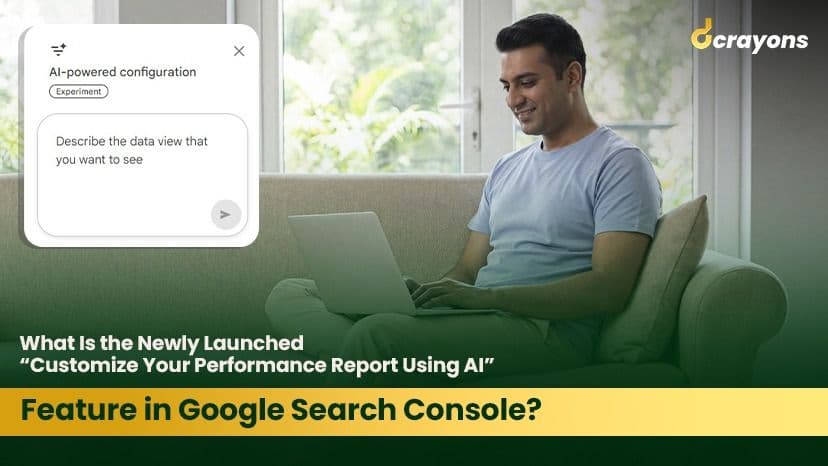
Towards the end of 2025, Google Search Console implemented an innovative improvement that helps website owners, SEO professionals, and marketers around the globe access performance reporting more easily and effectively. This addition. often referred to as "personalising your performance report with the help of AI". is a significant break from manual filtering and a step toward natural-language report setup.
In this comprehensive guide, we'll explore:
- What the new AI feature is
- How it works
- What benefits it offers
- Why it matters for SEO and digital marketing
- Practical use cases
- How agencies like a digital marketing agency in Delhi or the best digital marketing agency in Delhi can use it
Whether you manage a blog, an e-commerce site, or enterprise-level content, understanding this change will help you find faster insights and better decisions.
What Is "Customise Your Performance Report Using AI"?
Google Search Console's Performance report just got an update with an AI-based configuration option that works like a human assistant. Users can simply type in their requests in natural language and get the desired report. rather than filtering, comparing, and setting metrics, they just tell the tool what they want.
Previously, there was a long process for selecting:
- Filters for queries
- Filters for pages
- Settings for country or device
- Date ranges
- Metrics (e.g., clicks, impressions, CTR, average position)
Now, a natural-language statement can be made like this:
"Please provide clicks and impressions data for mobile users in India for queries containing 'SEO services' in the last 90 days."
Google's AI will understand your request, apply the necessary filters, and hand you the prepared report quickly. minimizing the effort involved.
How the AI-Powered Report Customisation Works
The AI-driven tool sits right within the Performance report interface and uses natural language understanding to convert your text into the underlying settings Search Console uses to generate reports.
Here's how it fundamentally operates:
Natural Language Interpretation
You type a request in everyday language. The AI interprets your intent and maps it to report settings.
Automatic Filter Application
The tool selects:
- Queries
- Dates
- Devices
- Countries
- Search appearances
...based on your prompt, eliminating manual clicks.
Comparison Setup
You can ask the tool to compare performance between two time periods (e.g., "Compare last month vs same month last year").
Metrics Selection
You can request specific metrics such as clicks, impressions, CTR (click-through rate), or average search position.
Example Prompt:
"Show me impressions and CTR for pages under /services for desktop users in India between October and December."
The AI then configures the filters and delivers the precise report.
Core Benefits of AI-Driven Report Customisation
This innovation changes the way digital marketers and SEO specialists handle data. The main advantages are:
Time Saving
Manually building custom reports can be tedious. especially when you manage large datasets or complex filters. AI-powered report creation eliminates repetitive configuration.
Accessibility for All Skill Levels
Constructing personalized reports by hand can be incredibly tedious, particularly when handling extensive databases or intricate filters. The generation of reports through AI removes the repetitive configuration steps that come with manual methods.
Anyone Can Use It
Less technical people, like business owners or new staff at a digital marketing agency in Delhi, can extract insights without possessing deep understanding of Search Console's filtering system.
Fewer Setup Errors
Using less manual input results in fewer chances for misconfigured reports, enhancing data accuracy.
Why This Matters for SEO and Digital Marketing
Performance reports in Search Console are the backbone of SEO analysis. They tell you:
- Which keywords drive traffic
- Which web pages perform best
- Where your audience is located
- What devices users use to find your content
The new AI support makes this actionable data significantly easier to access. and that's a big deal.
Better Trend Detection
When you can ask questions like:
"Show me which pages lost the most impressions after the core update,"
...you immediately see patterns rather than needing to build complicated filters manually.
Improved Reporting for Clients
A digital marketing agency in Delhi or the best digital marketing agency in Delhi can offer more intuitive and rapid reporting to clients, improving transparency and satisfaction.
Traditionally, agencies had to manually build custom reports or use third-party tools. Now, they can stay within the Search Console and produce tailored insights quickly.
Real-World Use Cases
Here are some practical scenarios where AI-powered report customisation shines:
Seasonal Campaign Analysis
A business wants to evaluate the performance of its holiday campaign. Instead of manually building filters, you can ask:
"Show me clicks and impressions for November vs October on all pages that mention 'holiday sale'."
The AI builds the comparison instantly.
Geographic Performance Insights
If an agency wants to understand how a site performs in a specific market:
"Display performance for users in Delhi over the past 6 months."
This is especially helpful for local SEO strategies and businesses targeting regional customers.
Device-Specific Trends
Mobile performance may differ significantly from desktop. The prompt:
"Show impressions and CTR for mobile devices across all pages with the word 'offer'."
...lets you pull device-specific insights quickly.
Quarterly Reporting for Clients
Agencies often need quarterly comparisons. A simple prompt like:
"Compare organic performance this quarter vs last quarter."
The AI handles the rest, creating a ready-to-present report.
Limitations (Important to Know)
While this feature is powerful, it's currently experimental and limited to the standard Search Results Performance report.
Some limitations include:
- Unavailable for Discover or News reports
- It configures filters and settings but doesn't interpret or summarize trends for you
- The AI may occasionally misunderstand a prompt, so reviewing chosen filters is important
Despite these constraints, the feature is a clear step toward more intelligent data interaction.
How Agencies Can Make the Most of It
For teams at agencies, whether a full-service digital marketing agency in Delhi or a top-ranked best digital marketing agency in Delhi, here's how to use this update:
Strategic Reporting for Clients
Use AI prompts to build client-ready reports faster, especially for monthly or quarterly performance reviews.
Focus on Insights
Spend less time building reports and more time interpreting them. identifying opportunities, diagnosing drops, and optimizing content.
Client Communication
Instead of generic analytics, focus conversations on insights that matter to clients. For example:
"Your mobile performance grew 15% in the last quarter."
This improves trust and brand credibility.
Competitive Advantage
Agencies that adapt quickly to Google's AI reporting capabilities can deliver more value. setting themselves apart as forward-thinking SEO partners.
Overall Summary
The new AI-based report customisation in Google Search Console is not only a convenience but an effective strategic move, allowing marketers, SEO experts, and agencies to obtain focused insights effortlessly.
With the ability to convert natural-language inputs into fully configured report templates, Google eases the data analysis bottleneck and speeds up decision-making. For businesses and agencies, whether you are a digital marketing agency in Delhi or want to be known as the best digital marketing agency in Delhi, this feature opens up opportunities for faster reporting, better client insight, and stronger SEO results.
Search Console is no longer just a performance tracking tool but a conversational data assistant. helping you focus on what really matters: expanding your online presence and enhancing search performance.